Sherry C
★★★★★
Sep 25, 2026“Mahdi was very helpful via whatsapp - responded very quickly to support requests, thank you!”
Back up Messenger conversations with messages, photos, videos, files, links, dates and timestamps in a clean PDF, structured CSV or organized ZIP. Chat Exporter Pro also supports WhatsApp Web, ChatGPT and Gemini, while your chat processing stays local in the browser.
PDF Studio gives you a dedicated workspace for large PDFs and post-export cleanup. Upload multiple PDFs, choose exact page ranges from any file, build a new PDF in any order, split a large document, edit selectable text, add text, shapes, highlights, pencil marks and images, or create multiple output files in one workflow.
Selected feedback shared by users on the Chrome Web Store after using Chat Exporter Pro for Messenger, AI chats, PDFs, CSV exports and complete backups.
“Mahdi was very helpful via whatsapp - responded very quickly to support requests, thank you!”
“Chat Exporter Pro has been very helpful for exporting my large Messenger conversations. The developer was patient, responsive, and worked hard to understand my specific requirements. He even created a customized solution for my large chat export and provided excellent support throughout the process. Highly recommended!”
“great product. very helpful. thank you Mahdi.”
“Excellent little tool for backups. The creator is quick to respond via Whatsapp and was super willing to help and make adjustment required to suit my needs. Very happy to have found this extension.”

“For anyone who needs to export long Messenger conversations, this extension is excellent. It handled my large chat smoothly and the developer was incredibly helpful throughout the process.”

“I found this extension while looking for a way to back up years of Messenger conversations, and it exceeded my expectations. What impressed me most was how smoothly it handled large chats without freezing my browser.”
“thanks to developer for support”

“amazing and useful .. i am so happy to use this. becuse this extention working lovely .. love it...”
“Thinks for making this beautiful tool. It was very usefull....💕”
“I faced a few problems initially, but after fixing them, this extension became extremely useful for my AI workflow. It’s simple, helpful, and makes using AI much easier and faster. Highly recommended!”
The free mode lets you verify the PDF result before paying. Lifetime Pro removes the export limits and unlocks the complete backup workflow.
★★★★★ 4.8/5 from 16 ratings · One-time payment · Refund policy
From a focused PDF to a large media archive, each step is designed to keep the export clear, reviewable and under your control.
Use one familiar workflow across messaging and AI platforms. Platform-specific scanning keeps the original message order and available metadata organized.
Export long personal or business conversations with dates, shared media, files and links.
Messenger exportSave WhatsApp chat history into readable PDF, structured CSV and organized ZIP folders.
WhatsApp backupPreserve useful AI research, plans, code discussions and long multi-message workflows.
AI chat exportTurn Gemini conversations into offline documents for study, research and project records.
Gemini exportChat Exporter Pro combines message tracking, large-chat safety controls and structured downloads in one Chrome extension for Messenger, WhatsApp Web, ChatGPT and Gemini.
Automatically scrolls through the available conversation, loads older content and tracks messages in their original order while live counters show progress.
Pause a long scan, continue from the tracked progress, or refresh the active conversation when the chat was opened after the extension.
Expand the tracked-message panel into a focused navigator. Click any tracked message to jump directly to that exact point in the original conversation.
Retains detected message data even when dynamically loaded platforms remove older items from the visible page during scrolling.
Uses message and file fingerprints to reduce duplicate messages, media and repeated links in the final export.
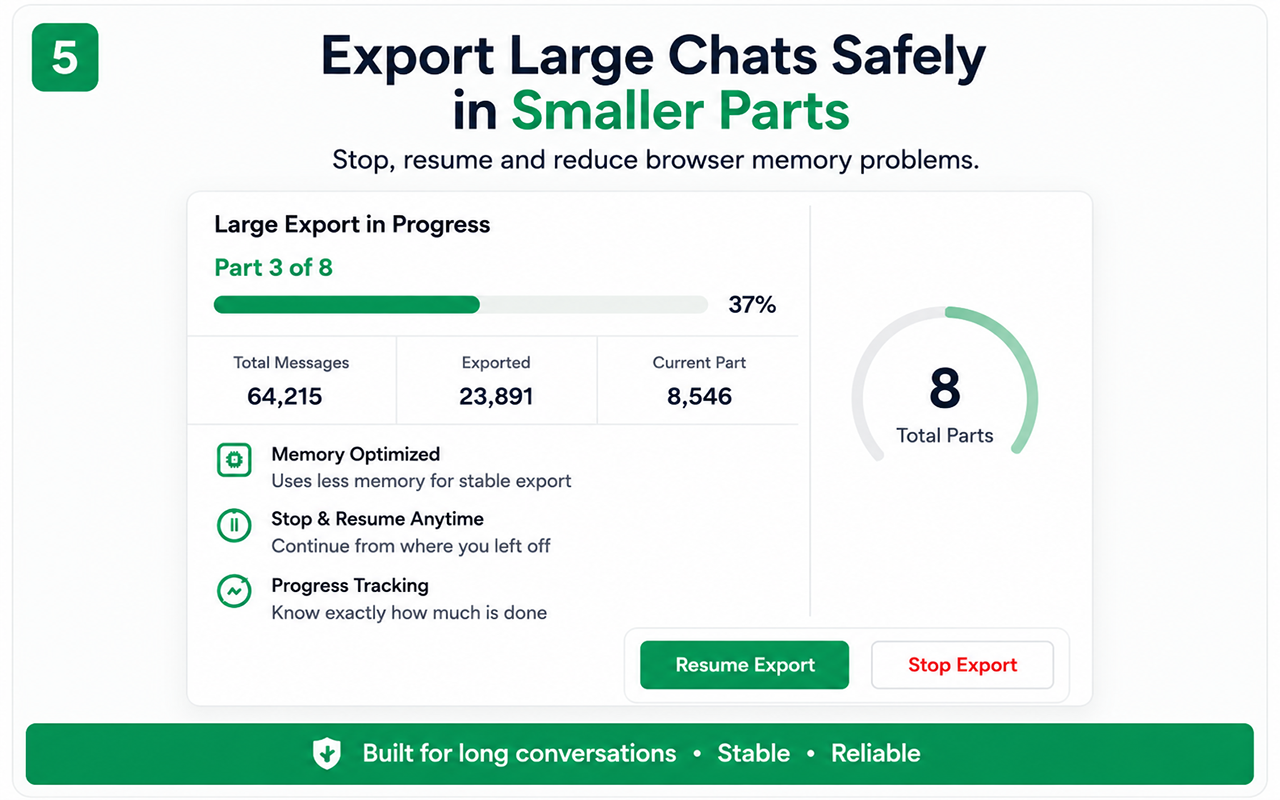
Processes very large histories in smaller parts and clears completed working data to reduce browser memory pressure and freezing.
Large or inaccessible files can be skipped safely and listed in the report. Very large videos may be excluded to protect browser stability.
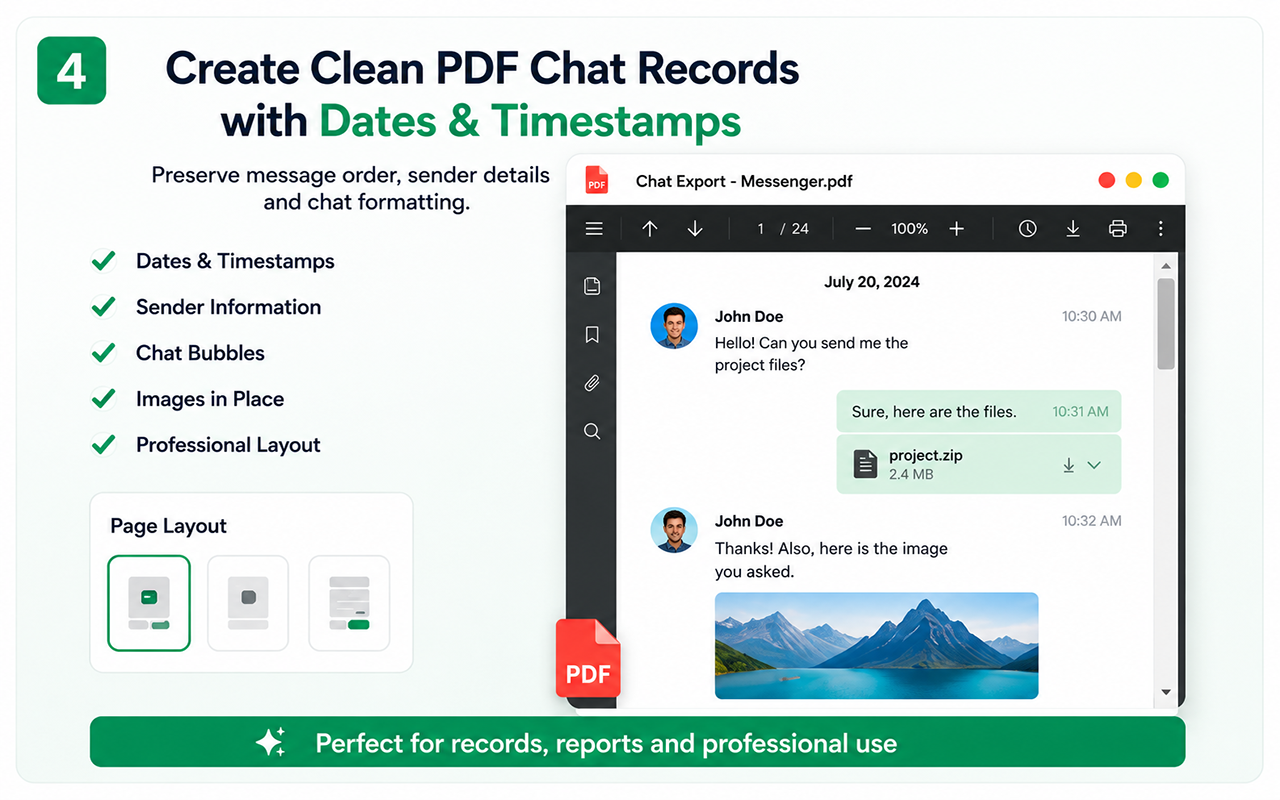
Creates readable PDFs with sender sides, chat bubbles, dates, timestamps, profile details and available images kept near their related messages.
Exports structured rows for message ID, sender, date, time, type and text so conversations can be searched, filtered and analyzed.
Summarizes processed messages, exported images, videos, documents, unique links, duplicate occurrences, skipped items and export-part information.
Use one familiar workflow across Facebook Messenger, WhatsApp Web, ChatGPT and Google Gemini.
Supported chat content is processed inside the browser. Conversation text and exported files are not intended to be uploaded to our servers.
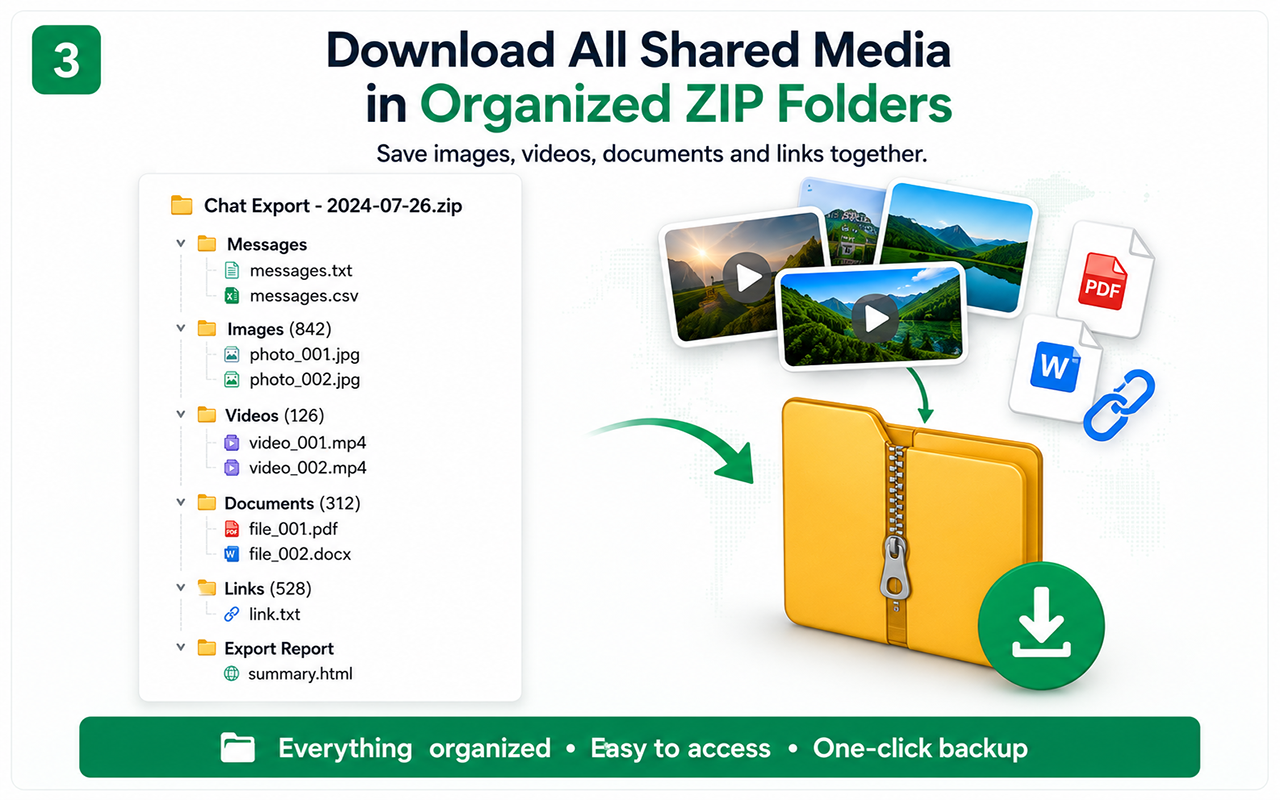
All Download creates a structured ZIP archive instead of mixing messages, media, documents and links together. Each export includes readable chat files and a detailed processing report.
chat-exporter-pro-backup/
├── messages/
│   ├── chat.txt
│   └── chat.csv
├── images/
│   ├── image_001.jpg
│   └── image_002.jpg
├── videos/
├── documents/
│   ├── pdf/
│   ├── txt/
│   └── other/
├── links/
│   └── links.txt
└── reports/
└── export_report.txtPreserve important conversations and available shared media as an organized offline archive.
Keep client instructions, order details, feedback, invoices and shared documents together.
Store useful ChatGPT and Gemini research, study notes, prompts, plans and technical answers.
Important: exported records may help with documentation, but legal admissibility depends on local law and the surrounding evidence.
Add Chat Exporter Pro from the Chrome Web Store and open a supported platform.
Choose a chat and use Auto Scan to load, detect and track the available content.
Download PDF or CSV, or use All Download for a structured ZIP backup with media and files.
The tutorials open directly on YouTube, avoiding browser and hosting restrictions that can block embedded players.
Learn how to scan a conversation and download PDF, CSV or the complete organized ZIP archive.
Pay securely through Paddle and receive your lifetime license automatically by email.
See how to upload large PDFs, choose exact page ranges, build new outputs and use the editor tools.
Set Facebook or Messenger and Chrome preferred language to English (United States), keep your real timezone unchanged, restart Chrome, hard refresh with Ctrl + Shift + R, and retry the export.
Detailed step-by-step pages help users discover the right export method from search and understand the product before installing it.
Save Facebook Messenger messages as PDF, CSV and an organized ZIP backup.
Back up WhatsApp Web messages, images, documents and links.
Download long AI conversations for reading, analysis and offline records.
Save Gemini research, prompts, answers and shared items.
Understand the All Download ZIP folders and detailed report.
Track a large chat and jump back to any detected message.
Resolve regional Messenger or WhatsApp date and timestamp format issues.
Open the editor below for large PDF work, exact page selection, multi-file merging, splitting and annotations. For the largest workspace or a separate browser tab, use the full editor button.
If your browser or a security extension blocks the embedded workspace, use Open full PDF Studio. Your Chat Exporter Pro licence can also unlock PDF Studio Pro.
Start with the 50-message PDF preview, then unlock unlimited history, CSV and organized media backup when you need the complete export.
Pay once securely through Paddle. No recurring subscription.
Secure checkout by Paddle · One-time payment · Refund policy
Existing lifetime licenses remain valid and can be used with PDF Studio Pro.
Chat Exporter Pro supports Facebook Messenger, WhatsApp Web, ChatGPT and Google Gemini. Because third-party sites can change, compatibility updates may occasionally be required.
Depending on the platform and plan, you can create PDF and CSV files or a structured ZIP archive containing available images, videos, documents, links, chat text and an export report.
The extension is designed to process conversation content locally in your browser. Chat Exporter Pro does not intend to collect, read or store your conversation text or exported files on its servers.
The free mode offers a 50-message PDF preview with a watermark. Supported images inside those selected messages can appear when available. Pro unlocks unlimited Auto Scan, CSV, organized ZIP media backup and watermark removal.
Yes. The current lifetime Pro licence can be used with PDF Studio Pro. Open PDF Studio, connect the same licence, and use the PDF builder/editor for page selection, multi-file combining, splitting and editing.
The extension includes part-by-part processing, stop/resume controls and duplicate protection to improve reliability on large histories. Extremely large files may be skipped and listed in the report to reduce browser overload.
No tool can guarantee legal admissibility. Exported chats can help with record keeping, but acceptance depends on your local law, authenticity requirements and supporting evidence.
Messenger and WhatsApp can display dates differently by country, language and right-to-left interface. Set Facebook or Messenger and Chrome preferred language to English (United States), keep your timezone unchanged, restart Chrome, hard refresh with Ctrl + Shift + R, and retry. See the complete date detection guide.
Install Chat Exporter Pro and create a cleaner, searchable and organized offline backup.